
 ไทย
ไทย English

Many cyber threats are caused by human error or unintentional mistakes made by employees, such as clicking phishing links, downloading files from untrusted sources, using weak or reused passwords, or disabling security controls. These risky behaviors can lead to serious consequences for organizations by allowing attackers to gain access to systems, steal sensitive data, or spread malware throughout the organization. As a result, businesses may experience operational disruption, data breaches, increased system recovery costs, and damage to their reputation. No matter how effective an organization’s security tools are, they cannot completely prevent risks caused by user behavior.
This article will help you understand which employee behaviors organizations should be aware of, why these behaviors pose cybersecurity risks, how they can impact business operations, and what organizations can do to reduce these risks. It also highlights five risky Endpoint behaviors that organizations should avoid
Table of Contents
What is Endpoint?
An Endpoint is an end-user device that connects to a network and is used to receive, transmit, or process data. Examples include computers, mobile devices, servers, and various Internet of Things (IoT) devices. These are the devices employees use to access organizational systems and data, making them important assets that should be protected against potential cyber threats.
Endpoint Security is a security solution designed to protect endpoint devices by detecting, preventing, and responding to cyberattacks, helping to enhance the overall security of endpoint devices. However, even with an effective Endpoint Security solution in place, organizations cannot fully defend against cyber threats if employees lack awareness of risky security behaviors.
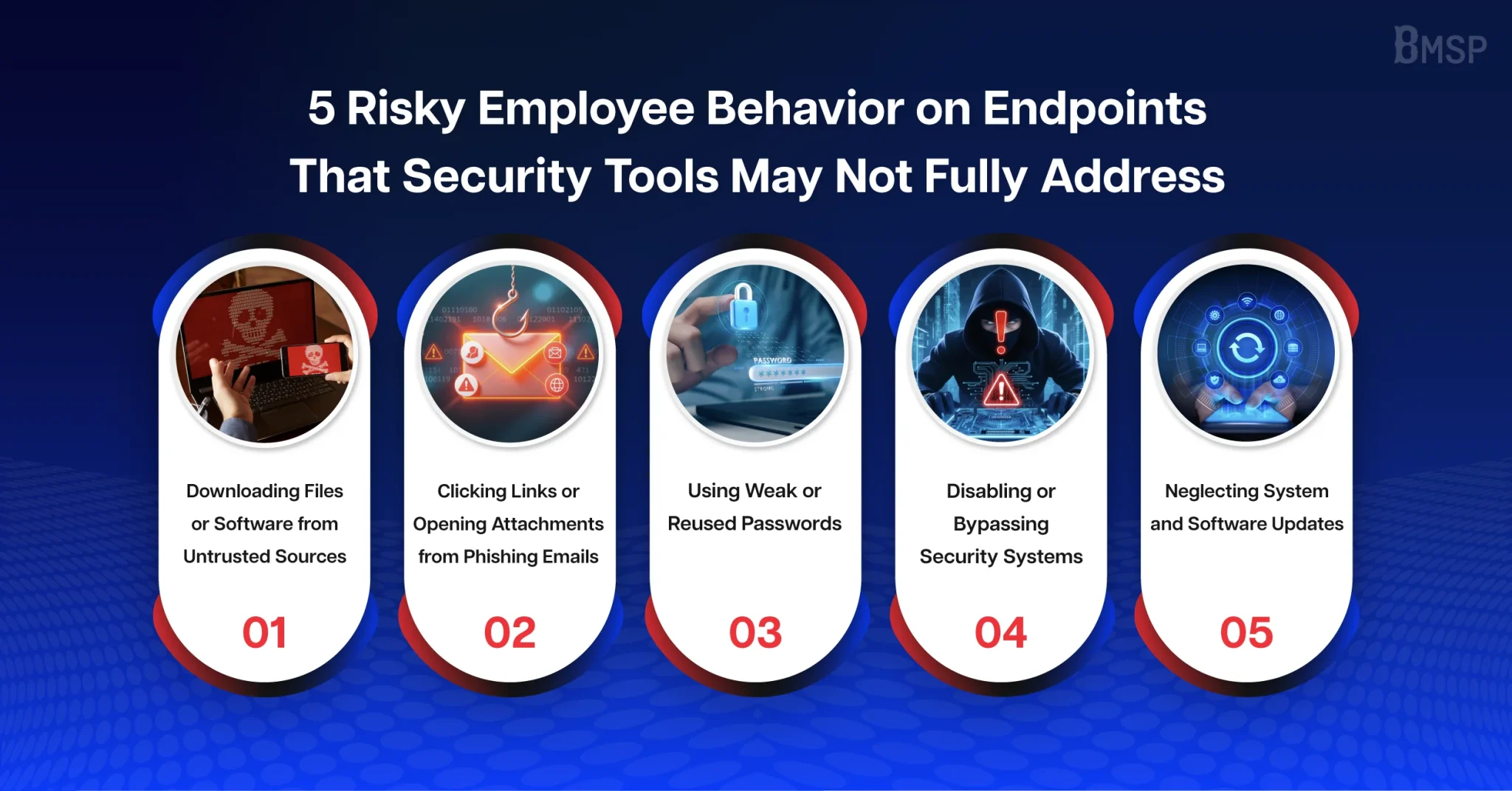
1. Downloading Files or Software from Untrusted Sources
Downloading files or software from untrusted sources, such as pirated software, unofficial websites, or files received from unverified sources, is a risky behavior that increases the security risks to Endpoints. These files may contain malware, ransomware, or other malicious programs without the employee’s knowledge. This behavior is often driven by the desire for convenience without fully understanding the potential security risks.
Once the file is opened or installed, attackers may use it as an entry point to gain access to the device, steal sensitive data, install malicious software, or spread attacks to other Endpoints within the organization’s network. As a result, business operations may be disrupted, sensitive data may be compromised, and organizations may incur significant costs for system recovery.
Recommended Measures to Prepare for and Reduce Cybersecurity Risks
- Establish a software installation policy that allows employees to install only software approved by the IT department.
- Deploy an effective Endpoint Security solution to detect and block malicious files before they can impact the system.
- Restrict software installation and user privileges based on the Principle of Least Privilege to reduce the likelihood of malware being installed or executed.
- Provide regular Cybersecurity Awareness training to help employees understand the risks of downloading files or software from untrusted sources.
- Provide employees with a catalog of organization-approved software to ensure they have safe alternatives for their work.
- Implement a Backup & Disaster Recovery (BDR) plan to enable rapid system recovery in the event of a malware or ransomware attack, minimizing business disruption and potential damage.
Example Use Case
An employee downloads free software from an untrusted website to complete a work task quickly without obtaining approval from the IT department. After installation, the software contains malware, which bypasses detection and begins spreading to other Endpoints across the organization’s network. As a result, sensitive data is encrypted by ransomware, some systems become unavailable, and the organization must spend significant time, resources, and money recovering its systems.
The risk of this type of incident can be reduced by implementing a policy that allows only IT-approved software to be installed, deploying Endpoint Security to detect and block malicious files, restricting software installation privileges based on the Principle of Least Privilege, providing regular Cybersecurity Awareness training, and implementing a Backup & Disaster Recovery (BDR) plan to ensure rapid system recovery when incidents occur.
2. Clicking Links or Opening Email Attachments from Phishing Emails
Email phishing is a type of cyberattack in which attackers impersonate legitimate organizations or trusted senders. For example, they may use email addresses or sender names that closely resemble genuine ones to appear as convincing as possible in order to deliver malicious links or harmful email attachments. This behavior is often caused by a lack of caution or the pressure to work quickly. By clicking a malicious link or opening an infected attachment, employees may unknowingly allow attackers to steal login credentials or download malware onto an Endpoint, using it as a foothold to penetrate the organization’s internal network. If employees fail to carefully verify the authenticity of the email, it may lead to data breaches, ransomware attacks, business disruption, and a loss of trust from customers and business partners.
Recommended Measures to Prepare for and Reduce Cybersecurity Risks
- Deploy Email Filtering / Anti-Phishing solutions to detect and block phishing emails before they reach employees’ inboxes.
- Provide regular Cybersecurity Awareness training to help employees recognize the warning signs of phishing emails, such as suspicious senders, fake links, suspicious attachments, or messages that create a sense of urgency.
- Conduct Phishing Simulation exercises regularly to assess employees’ security awareness and use the results to improve the effectiveness of future training.
- Establish a clear process for reporting suspicious emails so employees can quickly notify the IT department and reduce the risk of cyber threats spreading throughout the organization.
- Enable Multi-Factor Authentication (MFA), which requires more than one authentication factor before granting access to a system, to minimize the impact even if employee credentials are compromised through a phishing attack.
Example Use Case
An employee receives an email that appears to be a notification from the Human Resources (HR) department requesting them to review their payslip through the attached link. After clicking the link, a login page that closely resembles the organization’s official website is displayed. Believing it to be legitimate, the employee unknowingly enters their username and password. The credentials are then sent to the attacker, who uses the compromised account to gain unauthorized access to the organization’s systems and expand the attack to other devices or systems within the network.
3. Using Weak or Reused Passwords
Using weak passwords, such as birthdays, names, or sequential numbers, as well as reusing the same password across multiple work and personal accounts, is a common risky behavior in organizations. This often occurs because employees prioritize convenience when remembering passwords without realizing that if one password is compromised, attackers can use it to attempt to access other accounts that share the same password.
Once attackers successfully obtain a password, they may gain access to employee accounts, steal sensitive information, or remain undetected within the system for an extended period. They can then use the compromised account to access sensitive data, impersonate the employee, and expand their attacks across the organization’s internal network, affecting business continuity and damaging the organization’s reputation.
Recommended Measures to Prepare for and Reduce Cybersecurity Risks
- Establish a Password Policy for employees, including minimum password length, the use of uppercase and lowercase letters, numbers, special characters, and regular password changes.
- Enable Multi-Factor Authentication (MFA), which requires more than one authentication factor before granting access to a system, to provide an additional layer of security even if a password has been compromised.
- Use a Password Manager to help employees create and securely store strong, unique passwords without having to reuse them.
- Provide regular Cybersecurity Awareness training to educate employees about the risks of using weak or reused passwords.
- Implement Password Breach Monitoring to detect compromised passwords and notify employees to change them immediately if a risk is identified.
- Configure an Account Lockout Policy to limit repeated failed login attempts and help prevent password guessing or brute-force attacks.
Example Use Case
An employee uses an easy-to-guess password, such as a birthday, name, or sequential numbers, and reuses the same password across multiple work and personal accounts. When one of those accounts is compromised, attackers use the leaked credentials to attempt to log in to other systems that use the same password. After successfully obtaining access, the attackers may gain unauthorized access to the employee’s account, steal sensitive information, or remain undetected within the system for an extended period. They may then impersonate the employee, perform unauthorized actions on the employee’s behalf, or expand their attacks to other systems and Endpoints within the organization’s network, affecting business operations, service continuity, and the organization’s reputation.
4. Disabling or Bypassing Security Controls
Disabling or bypassing security controls on devices, such as turning off Antivirus, disabling the Firewall, or bypassing the use of a VPN while working remotely, is a risky behavior commonly seen among employees. This often occurs because employees believe these security controls slow down their devices or interfere with their work, so they disable them for convenience without realizing that doing so exposes their devices to security risks.
When security controls are disabled, the device can no longer detect or protect against cyber threats in real time. As a result, malware or other cyberattacks can more easily compromise the device without being detected and may spread to other devices within the organization’s network before the IT department can respond. This can lead to severe damage because there is no security system in place to detect or block the attack at an early stage.
Recommended Measures to Prepare for and Reduce Cybersecurity Risks
- Establish a policy that prohibits employees from disabling or modifying security settings, and grant management privileges only to the IT department.
- Deploy a Centralized Endpoint Management solution to centrally monitor and manage the security status of all Endpoint devices.
- Configure automatic alerts to notify the IT department immediately whenever a security solution is disabled or stops functioning, enabling prompt investigation and remediation.
- Enforce automatic software updates and security patches to reduce vulnerabilities that could be exploited by attackers.
- Restrict administrator privileges on employee devices based on the Principle of Least Privilege to prevent unauthorized changes to security settings.
- Provide regular Cybersecurity Awareness training to help employees understand the importance of security controls and the potential consequences of disabling them.
Example Use Case
An employee temporarily disables Endpoint Security in order to install software required for work. The software contains malware, and because the security solution has been disabled, it is unable to detect or block the threat in time. As a result, the malware spreads to other devices within the organization and disrupts business operations.
5. Failing to Keep Systems and Software Up to Date
Software updates are released to patch security vulnerabilities and prevent attackers from exploiting them. Software vendors continuously identify and analyze security vulnerabilities, making software updates an essential security measure rather than something that should be overlooked. These updates are specifically designed to protect users from emerging cyber threats.
However, some employees postpone or avoid installing updates because they are concerned that updates may interrupt their work or require their devices to restart. As a result, Endpoint devices remain vulnerable to attacks. Attackers may exploit these unpatched vulnerabilities to gain unauthorized access to systems, install malware, or escalate privileges to access sensitive organizational data. This can lead to data breaches, system downtime, increased recovery costs, and disruptions to business continuity.
Recommended Measures to Prepare for and Reduce Cybersecurity Risks
- Enforce automatic software updates and security patch deployment instead of relying on employees to install updates manually.
- Establish clear policies and timelines for system updates to ensure that all devices are updated within the required timeframe.
- Configure automatic alerts to identify devices that have not been updated or are running software versions that are no longer supported.
- Restrict network access for devices that do not meet security compliance requirements by implementing Network Access Control (NAC) until the required updates have been installed.
Example Use Case
An employee postpones an operating system update for several weeks because they do not want to restart their computer. An attacker then exploits an unpatched vulnerability to compromise the device and install malware to gain access to the organization’s internal data. As a result, the IT department must spend significant time recovering the system and investigating the extent of the damage.
Strengthen Your Organization’s Endpoint Security with BMSP
Effective Endpoint cyber threat protection requires not only robust security solutions but also employee security awareness. Employee behavior remains one of the key factors that can create opportunities for cyberattacks. Therefore, organizations should prioritize building cybersecurity awareness, establishing clear security policies, and ensuring that employees strictly follow them to reduce the risk of human error.
At the same time, implementing an effective Endpoint Security solution enhances an organization’s ability to detect, prevent, and respond to cyber threats quickly, helping to minimize the risk of attacks spreading to other systems and devices across the organization.
If your organization is looking for Endpoint Security solutions such as Next-Generation Antivirus (NGAV), Endpoint Detection and Response (EDR), Extended Detection and Response (XDR), or Data Loss Prevention (DLP), along with expert guidance, BMSP is ready to provide consultation, system design, and implementation services tailored to your organization’s security requirements, helping strengthen cyber threat protection and reduce cybersecurity risks.