 ไทย
ไทย English

Remote Monitoring and Management (RMM) is a system that enables IT teams to remotely monitor and manage every device within an organization. The system continuously monitors the operating status of devices 24 hours a day and provides real-time alerts immediately when abnormalities are detected, allowing IT teams to analyze and resolve issues quickly before they affect business operations, without the need to travel to each individual device. RMM is available in both Cloud-Based Software as a Service (SaaS), which can be accessed through a web browser, and On-Premises, which is installed and operated within the organization’s infrastructure.
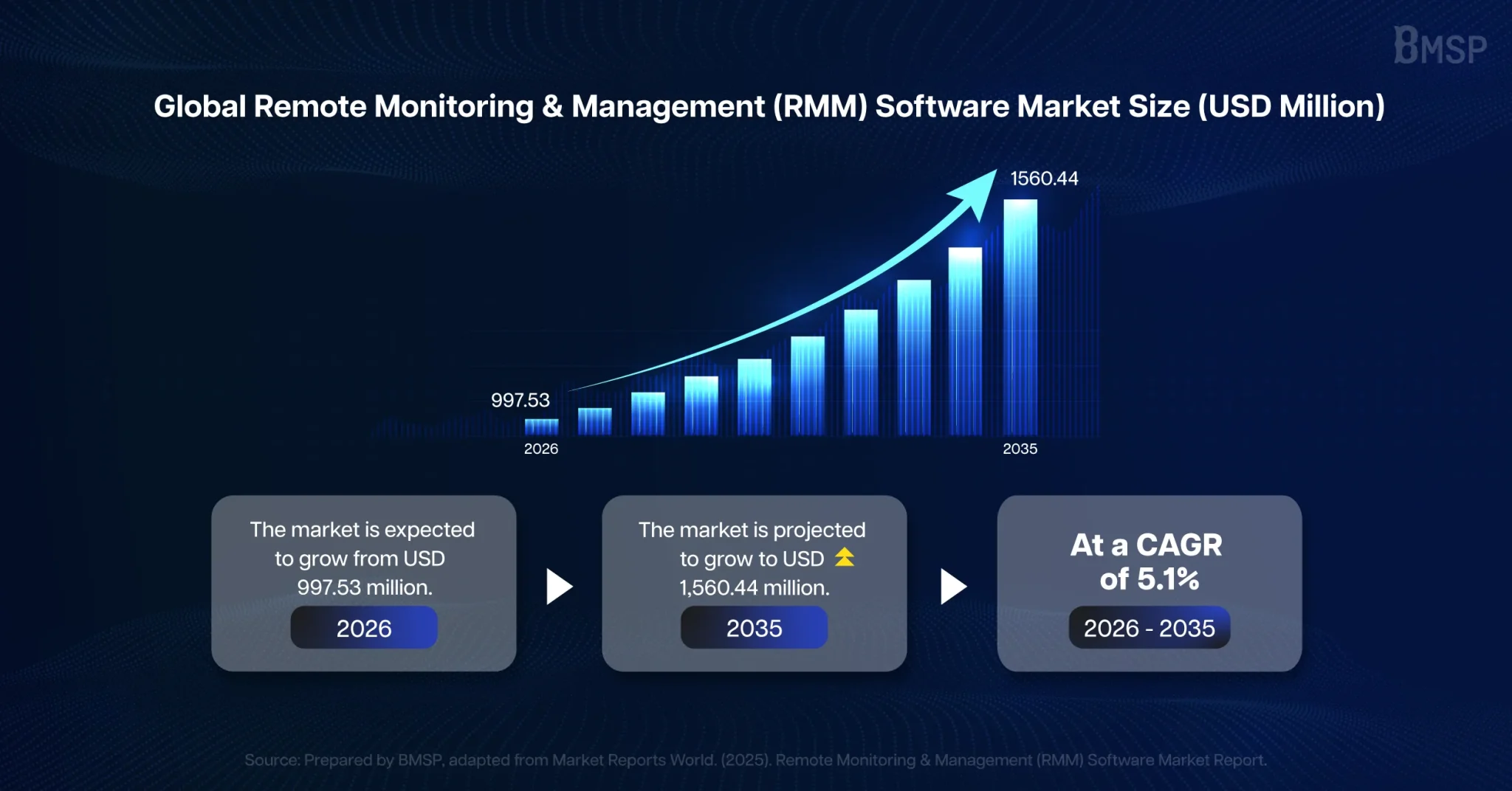
According to a report by Market Reports World, the global Remote Monitoring and Management (RMM) Software market is projected to reach approximately USD 997.53 million in 2026 and grow to USD 1,560.44 million by 2035, with a compound annual growth rate (CAGR) of approximately 5.1%. This reflects that organizations worldwide are placing greater importance on Remote Monitoring and Management (RMM) to prevent issues before they impact business operations.
With the ability of Remote Monitoring and Management (RMM) to monitor systems and provide real-time alerts remotely, organizations can detect and resolve issues promptly before they affect business operations. As a result, employees can continue working without interruption, and organizations can operate more efficiently.
In this article, we will help you understand what Remote Monitoring and Management (RMM) is, how it helps reduce downtime and improve business continuity, and explore the three key mechanisms of Remote Monitoring and Management (RMM) that help reduce downtime before it impacts business operations. Read on to learn more in each section of this article.
Table of Contents
3 Key Mechanisms of Remote Monitoring and Management (RMM) That Help Reduce Downtime Before It Impacts Business Operations
Before taking a closer look at these key mechanisms, let’s first understand what downtime is.
Downtime is a period during which a computer system, server, or website is unable to operate normally. As a result, employees are unable to access the services or information they need. If downtime occurs frequently or lasts for a prolonged period, it may lead to the loss of business opportunities, revenue, and organizational credibility.
Many people view Remote Monitoring and Management (RMM) as merely a tool that enables IT teams to remotely resolve issues more quickly when system failures occur. However, in reality, RMM is designed to prevent issues before they impactbusiness operations through a proactive approach that includes monitoring, alerting, and automated remediation. This helps reduce the likelihood of downtime and continuously improve system availability.
Mechanism 1: Detect Abnormalities at an Early Stage Before Downtime Occurs
Instead of waiting for employees to encounter problems and report them to the IT team, Remote Monitoring and Management (RMM) continuously monitors the operating status of computers, servers, and network devices 24 hours a day. The RMM system monitors and analyzes abnormal conditions that may lead to system disruption, such as server storage nearing full capacity, unusually high CPU or memory utilization, device temperatures exceeding predefined thresholds, or critical services stopping unexpectedly. When a potential risk is detected, the system immediately sends an alert to the IT team, enabling them to inspect and resolve the issue at an early stage before the abnormal condition develops into downtime and affects business operations.
Mechanism 2: Automatically Resolve Issues to Reduce Risk and Maintain Business Continuity for Employees
When an abnormal condition has a predefined remediation procedure, Remote Monitoring and Management (RMM) can automatically resolve the issue through its automation capabilities. This helps reduce response time and the workload of the IT team. RMM can execute workflow automation based on conditions defined by the organization. For example, when the system detects that a critical service has stopped, it can automatically restart the service. If server storage is nearing full capacity, the system can delete temporary files and immediately perform other predefined actions. These automation capabilities enable organizations to resolve recurring issues quickly, reduce the risk of system disruption, and ensure that critical services continue to operate even when no IT staff are on duty.
Mechanism 3: Access and Resolve Issues Remotely to Reduce System Recovery Time
When complex issues require investigation by specialists, Remote Monitoring and Management (RMM) enables IT teams to access affected devices remotely in real time without the need to travel to the device location. This helps reduce response time, resolve issues more quickly, and minimize the impact of downtime on business operations.
As shown above, Remote Monitoring and Management (RMM) is not merely a tool for remote troubleshooting. It also enables organizations to detect abnormalities, generate alerts, and resolve issues quickly through its three key operational mechanisms. These capabilities help reduce the risk of downtime and support continuous business operations.
How Remote Monitoring and Management (RMM) Works
To better understand how Remote Monitoring and Management (RMM) works, it is important to understand the workflow of the system, from installation, collecting data from devices, detecting and alerting abnormal conditions, resolving issues through automation and remote support, to reporting and analyzing system trends. These are key processes that help reduce the risk of downtime, as follows:
1. Install an Agent on the Devices to Be Managed
The RMM system installs an Agent that acts as an intermediary for sending data to and receiving commands from the central cloud system. The Agent is a lightweight software application installed on endpoint devices, enabling them to receive commands from the IT team for remote management. It can be installed on endpoint devices such as computers, laptops, and servers, or connected to cloud systems to collect and transmit data to the RMM system.
2. Collect Device and System Status Data
The installed Agent collects status information related to hardware, software, network performance, and security events, and then sends the data to the RMM system. For example, it monitors hardware conditions such as CPU temperature, software information such as installed applications and antivirus status, and network conditions such as speed, stability, and device connectivity.
3. Analyze and Detect Abnormal Conditions in Real Time
The RMM system analyzes the data received from the Agent in real time to detect abnormal conditions or events that may affect system operations, such as unusually high resource utilization, storage space nearing full capacity, or critical services stopping unexpectedly.
4. Alert the IT Team When Abnormal Conditions Are Detected
When an abnormal condition is detected, the system sends an alert to the IT team so they can quickly identify and resolve the issue, reducing the risk of downtime.
5. Resolve Issues Quickly with Automation and Remote Support
The RMM system can perform automated actions based on predefined policies or conditions, such as patch installation, software updates, or basic troubleshooting. It also supports remote support, allowing the IT team to remotely access and resolve issues on devices quickly. This helps reduce downtime and improves the efficiency of IT management.
6. Generate Reports and Analyze System Trends
The RMM system summarizes operational data, recorded events, and problem trends in the form of reports. These reports help organizations plan improvements, enhance operational efficiency, and strengthen the security of their IT systems.
Remote Monitoring and Management (RMM) enables organizations to move from a reactive approach waiting for issues to occur before resolving them to a proactive approach that detects issues before they impact business operations. As a result, RMM helps prevent downtime, improve IT team efficiency, and strengthen long-term cybersecurity.
How to Choose the Right Remote Monitoring and Management (RMM) for Your Business
As businesses become increasingly dependent on digital systems, even a short period of IT system disruption can immediately affect business operations, revenue, and customer confidence. Choosing the right Remote Monitoring and Management (RMM) solution is therefore an important factor. With many RMM solutions available on the market, the following key factors can help organizations choose the most suitable and cost-effective solution for their business.
1. Choose an RMM That Fits the Size and Requirements of Your Organization
Before selecting an RMM solution, organizations should consider whether it supports the minimum and maximum number of endpoints they need to manage. They should also evaluate its pricing model, such as whether pricing is based on the number of endpoints or the number of IT technicians, to ensure it aligns with the organization’s budget.
2. Support Real-Time Monitoring and Alerting
Choose an RMM solution that can monitor the status of devices and systems in real time and provides intelligent alert filtering. The system should be able to classify alerts based on their severity, enabling the IT team to prioritize the most critical issues immediately and reduce the risk of business downtime.
3. Support Automation and Patch Management
Choose an RMM solution that provides a flexible automation workflow, allowing the system to automatically perform predefined remediation tasks. It should also include robust patch management capabilities that support updates for both operating systems (OS) and third-party software, such as Adobe and Chrome, from a centralized console. This helps reduce the unnecessary time IT teams spend manually updating Windows devices one by one.
4. Provide Cybersecurity Support
Choose an RMM solution that offers secure authentication methods, such as Two-Factor Authentication (2FA) or Multi-Factor Authentication (MFA). It should also be capable of monitoring the status of antivirus solutions, EDR, and detecting vulnerabilities across all devices within the organization, helping the security team protect against cyber threats more effectively.
5. Support Both Cloud and On-Premises Environments
Modern organizations operate across both cloud and on-premises environments. Therefore, organizations should choose an RMM solution that can centrally manage devices and systems across multiple environments. The solution should be highly flexible, allowing agents to be deployed and data to be collected from all types of devices into a single centralized dashboard, regardless of whether the devices are located at the head office, branch offices, or other work sites.
6. Support Future Business Growth
Choose an RMM solution that can easily scale with business growth by allowing organizations to increase or decrease the number of endpoint licenses as needed. This enables organizations to support future expansion without spending additional time and cost replacing the software with a new solution.
Choosing the right Remote Monitoring and Management (RMM) solution is not about selecting the most expensive software or the one with the most features. It is about selecting a solution that best fits the organization’s requirements, management policies, budget, IT management needs, and operational readiness. The right RMM solution helps reduce downtime, improve IT team efficiency, and strengthen cybersecurity, enabling organizations to support sustainable business growth.
Benefits of Remote Monitoring and Management (RMM) for Organizations
Remote Monitoring and Management (RMM) is an essential tool that enables organizations to remotely monitor, manage, and maintain their IT systems. It transforms IT management from a reactive approach waiting for issues to occur before resolving them—to a proactive approach that detects and prevents issues before they impact business operations. Through real-time system monitoring, alert notifications when abnormalities are detected, and automated remediation, RMM helps reduce downtime, improve business continuity, and strengthen cybersecurity for organizations.
BMSP is ready to help organizations implement Remote Monitoring and Management (RMM) through it’s Managed Service offering and a team of IT and Cybersecurity specialists. BMSP can tailor solutions to meet each organization’s budget and business requirements, enabling organizations to continuously manage their IT infrastructure, reduce downtime, and improve their readiness to respond to potential risks. In the future, effective IT management will not only be about resolving issues quickly, but also about identifying issues before they impact the business.
Reference: Market Reports World, Remote Monitoring & Management (RMM) Software Market Size, Share, Growth, and Industry Analysis, Last Updated: 26 April 2026.
https://www.marketreportsworld.com/market-reports/remote-monitoring-management-rmm-software-market-14727470