
 ไทย
ไทย English

In 2026, cyber threats continue to increase in frequency, severity, and complexity. Cyberattacks are no longer targeting only large enterprises but are also increasingly aimed at small and medium-sized businesses (SMBs). This is because many organizations still face limitations in terms of budget, IT personnel, and comprehensive security systems, while also lacking formal cybersecurity policies, making it easier for hackers to launch attacks. However, many organizations may still believe that small businesses are not attractive targets for hackers.
Over the past year, many small businesses have fallen victim to ransomware, phishing attacks, employee account compromise, and data breaches. A single incident can result in the loss of critical business data, recovery costs, and damage to customer trust.
Although small businesses may not have the same level of IT resources or budget as large enterprises, building an effective security system remains essential. It does not necessarily require a large investment at the beginning. Instead, selecting cybersecurity solutions that are appropriate forthe nature of the business can help reduce risks and improve preparedness against cyber threats.
In this article, BMSP introduces 7 cybersecurity solutions that small and medium-sized enterprises (SMEs) should have in 2026. These are fundamental cybersecurity solutions that every organization including small businesses should adopt to defend against cyber threats and reduce risks that could impact the business. They can be implemented immediately. This article also explains what each solution is, why it is important, how it helps protect organizations, and provides practical examples of its implementation, serving as a guideline for building a strong cybersecurity foundation for your business.
Table of Contents
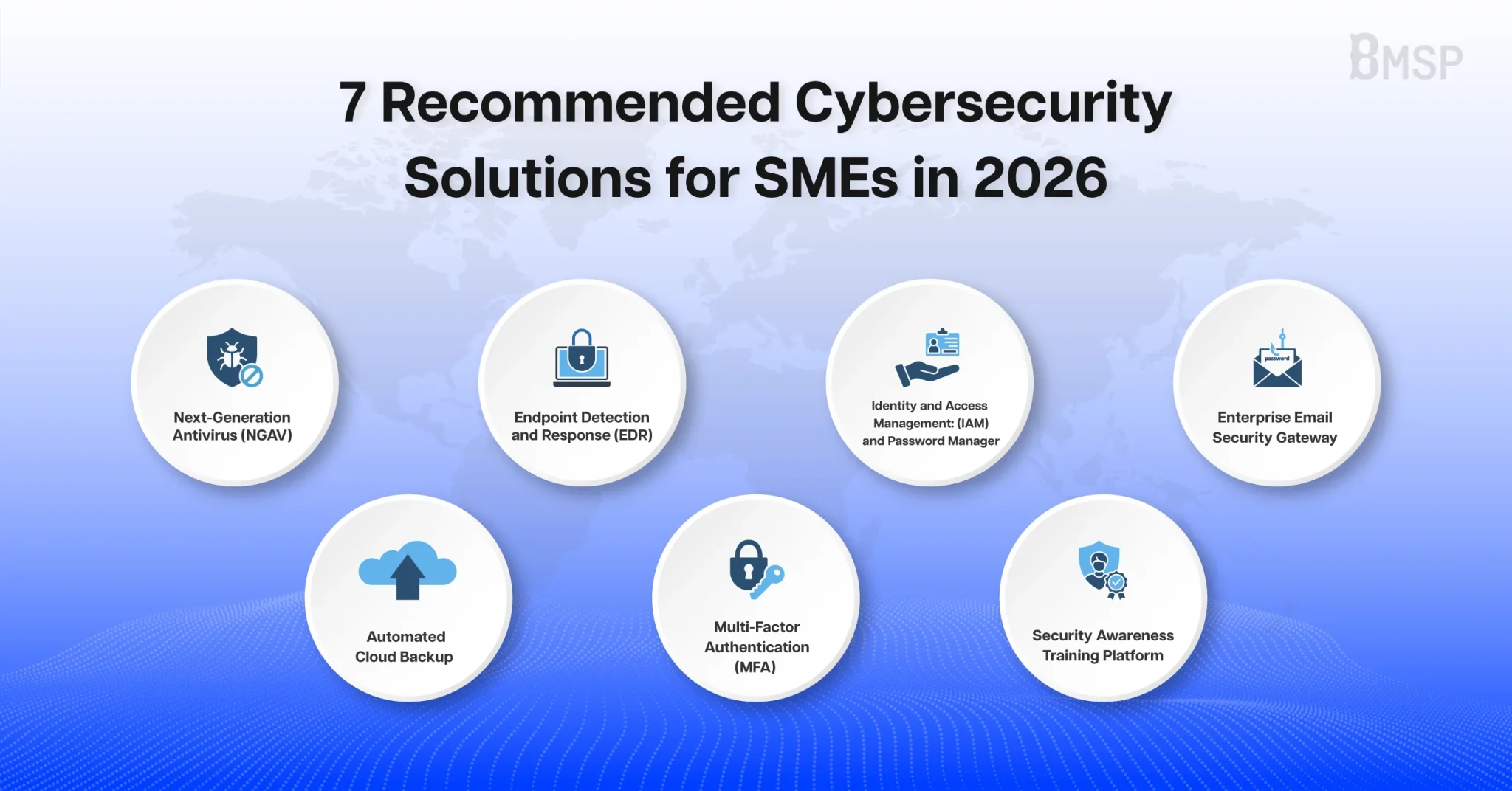
7 Recommended Cybersecurity Solutions for SMEs in 2026
1. Next-Generation Antivirus (NGAV)
Next-Generation Antivirus (NGAV) is a malware protection solution for endpoints such as computers, laptops, and servers. These endpoints are among the primary targets that hackers use to attack organizations, especially small businesses that regularly rely on email, the internet, and file downloads in their daily operations. If even a single endpoint becomes infected with malware, it may result in critical data being encrypted, data leakage, or the spread of malware to other devices within the organization, ultimately disrupting business operations. Modern threats such as ransomware and advanced malware have become increasingly sophisticated. As a result, traditional antivirus software that relies solely on signature-based detection may no longer be sufficient to effectively detect or defend against certain types of attacks.
Next-Generation Antivirus (NGAV) was developed to address modern cyber threats by using technologies such as AI, Machine Learning, and Behavior Analysis to analyze the behavior of files and applications in real time. This enhances its ability to detect and prevent sophisticated threats, including new malware variants and threats that do not yet have signatures in existing databases.
For small businesses, deploying NGAV is a worthwhile investment. Although SMEs often face budget and IT staffing limitations, NGAV is available in a variety of packages to suit different budgets. It also helps reduce the workload of IT teams by minimizing the need for continuous manual monitoring. NGAV strengthens endpoint protection, reduces the risk of business disruption, and helps lower the costs associated with system recovery after a cyberattack.
How does NGAV help protect organizations?
- Detects and blocks malware, including ransomware, in real time.
- Analyzes the behavior of files and applications to defend against emerging threats such as zero-day attacks and fileless malware.
- Blocks or quarantines malicious files before they can damage the system.
- Reduces the risk of data leakage and the spread of malware within the organization.
- Enables administrators to centrally manage and monitor the protection status of all endpoints.
Example Use Case
An employee receives a phishing email containing a malicious attachment and accidentally opens the file. When the program starts running, NGAV analyzes its behavior in real time, such as attempts to modify a large number of files, access critical areas of the system, or execute processes that resemble ransomware activity.
If the system detects suspicious behavior, NGAV immediately blocks or quarantines the file before data is encrypted or the malware spreads to other devices within the organization. This helps minimize damage, improves the organization’s ability to contain the incident quickly, and enables business operations to continue with less disruption.
2. Endpoint Detection and Response (EDR)
Endpoint Detection and Response (EDR) is a security solution that helps detect, analyze, and respond to threats on endpoints. It continuously records system activities by monitoring system behavior and endpoint events in real time, alerts administrators when suspicious activity is detected, and can take response actions such as device isolation or terminating malicious processes to minimize damage and prevent threats from spreading to other systems. It also enables organizations to investigate security incidents retrospectively to determine their root cause.
Although NGAV provides protection against cyber threats, some attacks can evade initial detection and remain hidden within the system for an extended period before exhibiting obvious malicious behavior. In some cases, this may take days or even weeks. Without a solution that continuously monitors endpoint activities and retains historical data, organizations may not know when the attack began, how far it spread, or the extent of the damage. For this reason, EDR was designed to detect, analyze, and respond to threats that may bypass the first layer of defense.
For small businesses, deploying EDR alongside NGAV provides a more comprehensive security approach. It enhances an organization’s ability to detect and respond to cyber threats more effectively, reduces the Mean Time to Detect (MTTD) and Mean Time to Respond (MTTR), and helps minimize business impact and the costs associated with cyberattacks.
How does EDR help protect organizations?
- Detects abnormal endpoint behavior in real time.
- Analyzes the behavior of files and applications to defend against emerging threats such as zero-day attacks and fileless malware.
- Blocks or quarantines malicious files before they can damage the system.
- Alerts administrators when suspicious activities are detected.
- Isolates compromised devices from the network to prevent the attack from spreading.
- Supports threat investigation by tracing the attack path, helping organizations analyze incidents and strengthen future defenses.
Example Use Case
An employee accidentally opens a malicious file that successfully bypasses initial detection. After the program begins running, EDR detects suspicious behavior, such as the creation of unusual processes, attempts to access a large number of files, and connections to external servers. The system immediately alerts the administrator and automatically isolates the affected device from the network. This enables the organization to contain the incident, prevent the attack from spreading, and reduce the impact on business operations.
3. Identity and Access Management (IAM) and Password Manager
Identity and Access Management (IAM) is a solution that helps organizations manage user identities and access permissions. It covers everything from authentication to authorization, ensuring that each employee can access only the systems and data they are authorized to use. A Password Manager works alongside IAM by securely generating, storing, and managing passwords, reducing the use of weak or reused passwords, which are among the leading causes of cyberattacks.
Account compromise is one of the most common methods hackers use to gain unauthorized access to organizational systems. If employees use weak passwords, reuse the same password across multiple systems, or if user accounts remain active after employees leave the organization, attackers may gain access to sensitive data or abuse legitimate user privileges to attack the system. For this reason, IAM and Password Manager play an important role in reducing the risk of unauthorized access while enabling organizations to manage user accounts in a structured and secure manner.
For small businesses, implementing IAM and a Password Manager is a worthwhile investment. These solutions help reduce the risk of employee account compromise, improve password security, and lessen the administrative workload involved in creating, modifying, or deactivating user accounts when personnel changes occur.
How do Identity and Access Management (IAM) and Password Manager help protect organizations?
- Enforce Role-Based Access Control (RBAC) by granting access based on each user’s role.
- Generate and securely store strong passwords while reducing password reuse.
- Reduce the risk of unauthorized access to systems and data.
- Enable centralized user account management and allow access privileges to be revoked quickly when employees leave the organization or change roles.
- Support user account auditing and activity monitoring to enhance organizational security.
Example Use Case
An employee leaves the organization, but their user accounts for email, the ERP system, and the file storage system remain active because some small businesses may not have personnel responsible for managing user accounts. Since the former employee is no longer part of the organization, if a hacker obtains those account credentials, they may gain access to the company’s sensitive information.
By implementing IAM, administrators can immediately revoke access to all systems from a centralized platform. At the same time, a Password Manager helps employees use strong and unique passwords for each system, reducing the risk of account compromise and password-related cyberattacks.
4. Enterprise Email Security Gateway
Enterprise Email Security Gateway is a solution that protects an organization’s email system by inspecting and filtering both incoming and outgoing emails before they reach employees. It helps prevent threats such as email phishing, malware embedded in attachments, and malicious links before employees accidentally open or click on them, thereby reducing the risk of users becoming victims of email-based attacks.
Email is one of the primary channels that hackers use to attack organizations because employees rely on email for daily business communication. One of the most common attacks is email phishing, where attackers make emails appear to come from trusted individuals or organizations, such as executives, business partners, or government agencies, in order to trick employees into disclosing sensitive information, transferring money, or opening attachments containing malware. In many cases, these emails are highly convincing, making even cautious employees vulnerable to the attack.
For this reason, an Enterprise Email Security Gateway plays a critical role in filtering threats before they reach end users. It helps reduce risks caused by human error and lowers the likelihood of successful attacks by using multiple layers of security technologies, such as sender reputation analysis, time-of-click protection for URLs, and sandboxing to scan email attachments in an isolated environment for hidden malware before the files are delivered to employees.
For small businesses, implementing an Enterprise Email Security Gateway helps reduce the burden on employees to identify malicious emails on their own, which is one of the areas most susceptible to human error. It also helps minimize the risk of financial losses and data breaches caused by email fraud, which is one of the leading causes of ransomware attacks and Business Email Compromise (BEC).
How does Enterprise Email Security Gateway help protect organizations?
- Detects and blocks email phishing, spam, and malware before they reach employees’ inboxes.
- Inspects suspicious attachments and links before allowing users to access them.
- Reduces the risk of Business Email Compromise (BEC) and email spoofing attacks.
- Supports sender authentication using standards such as SPF, DKIM, and DMARC.
- Reduces the likelihood of users becoming victims of email-based attacks.
Example Use Case
An employee receives a spoofed email that appears to come from a trusted business partner and includes an invoice attachment. The attachment contains malware designed to steal the organization’s data. Before the email reaches the employee’s inbox, the Enterprise Email Security Gateway detects the malicious attachment, blocks the email, and alerts the administrator. As a result, the employee is unable to open the malicious file, preventing the threat from entering the organization’s network.
5. Automated Cloud Backup
Automated Cloud Backup is a solution that automatically backs up an organization’s critical data to the cloud based on a predefined schedule, eliminating the need to rely on employees to perform manual backups, which are often forgotten or carried out inconsistently. A widely accepted best practice for data backup is the 3-2-1 Backup Rule, which recommends maintaining at least three copies of data, storing them on two different types of storage media, and keeping one copy off-site to protect against the simultaneous loss of both the original data and backup copies.
Many small businesses do not have an appropriate backup system. Some organizations keep only a single backup stored on the same device as the original data. If an incident such as a hard drive failure, fire, or a ransomware attack occurs, both the original data and backup files stored on the same network may be encrypted or destroyed, leaving the organization unable to recover its data. This can have a significant impact on business operations. Automated Cloud Backup helps reduce this risk by storing multiple backup copies across different storage media, including cloud storage located outside the organization’s network. As a result, even if both the original data and on-premises backup files are compromised, organizations can still restore their data from the unaffected cloud backup. In addition, automated backups reduce the risk of human error caused by forgotten or inconsistent backup procedures.
For small businesses, implementing Automated Cloud Backup reduces the workload of IT administrators, minimizes the risk of missed backups, and helps ensure that critical business data is backed up consistently. It also helps lower system recovery costs and reduces the impact on business operations when unexpected incidents occur.
How does Automated Cloud Backup with the 3-2-1 Backup Rule help protect organizations?
- Automatically backs up critical data to the cloud on a predefined schedule, reducing reliance on manual backup processes.
- Stores backup data according to the 3-2-1 Backup Rule to improve data protection and recovery readiness.
- Keeps backup copies off-site, protecting them from ransomware attacks that encrypt files within the organization’s network.
- Enables faster recovery of data and systems following unexpected incidents.
- Reduces the risk of human error caused by inconsistent backup practices.
Example Use Case
An employee accidentally opens a file infected with ransomware, causing files stored on the organization’s server to be encrypted and become inaccessible. However, because the organization has implemented Automated Cloud Backup based on the 3-2-1 Backup Rule, the administrator is able to restore the data from an unaffected backup copy. As a result, the business can resume operations within a short period, minimizing damage and eliminating the need to pay a ransom to the attackers.
6. Multi-Factor Authentication (MFA)
Multi-Factor Authentication (MFA) is a security solution that enhances user authentication by requiring more than one authentication factor before granting access to a system. In addition to a username and password, MFA may use hardware security keys, 2FA tokens, authenticator apps, or biometric authentication. Most organizations choose easy-to-use MFA methods such as SMS one-time passwords (OTP), authenticator apps, or push notifications sent to a smartphone. As a result, even if a password is exposed or stolen, unauthorized users cannot access the system without completing the additional authentication step.
Hackers commonly steal user credentials through email phishing, data breaches, or by exploiting password reuse across multiple systems. If an organization relies solely on usernames and passwords for authentication, attackers may gain access to email accounts, cloud services, or other critical organizational data. For this reason, Multi-Factor Authentication (MFA) plays an important role in strengthening identity verification and reducing the risk of unauthorized access, even if passwords have been compromised.
For small businesses, implementing MFA is a worthwhile investment because it can often be enabled immediately using existing systems without additional cost. It also significantly reduces the risk of account compromise. Even with limited budgets and IT resources, SMEs can strengthen their security posture without requiring a major investment.
How does Multi-Factor Authentication (MFA) help protect organizations?
- Strengthens user authentication by requiring more than one authentication factor.
- Reduces the risk of account compromise, even if passwords are leaked.
- Prevents unauthorized access resulting from phishing attacks and stolen credentials.
- Supports multiple authentication methods, including hardware security keys, 2FA tokens, authenticator apps, and biometric authentication.
- Is well suited for protecting privileged accounts and systems containing critical organizational data.
Example Use Case
An employee accidentally enters their username and password on a phishing website, allowing a hacker to obtain the login credentials. However, the organization has enabled Multi-Factor Authentication (MFA) for the account. As a result, the attacker is unable to access the system because they cannot complete the second authentication step, such as verification through an authenticator app or a hardware security key. Consequently, the organization’s account and critical data remain protected.
7. Security Awareness Training Platform
Security Awareness Training Platform is a solution that helps educate employees and build cybersecurity awareness through training courses, quizzes, and phishing simulations. It enables employees to recognize and respond appropriately to cyber threats, helping reduce risks caused by human error.
Even if an organization invests in advanced cybersecurity solutions, employees can still become victims of cyberattacks if they lack cybersecurity awareness. Common examples include clicking phishing links, opening malware-infected attachments, using weak passwords, or unintentionally disclosing sensitive information. These are among the most common causes of cybersecurity incidents across organizations. Therefore, building security awareness is an essential measure for effectively reducing the likelihood of cyber incidents. A Security Awareness Training Platformstrengthens an organization’s security posture by teaching employees how to identify phishing emails, handle sensitive information with care, and follow the proper procedures for reporting suspicious activities to the IT team. In addition, conducting phishing simulations on a regular basis enables organizations to identify employee groups that remain at higher risk and provide targeted training where it is needed most.
For small businesses, implementing a Security Awareness Training Platform is a necessary investment. Having a strong foundation in cybersecurity awareness helps employees become more cautious and understand the correct security practices, providing significant benefits to the organization by preventing incidents at an early stage. The platform continuously improves employees’ cybersecurity knowledge while allowing organizations to track learning progress, measure training effectiveness, and assess employee security awareness. This enables organizations to identifyweaknesses and refine their training programs based on actual risks.
How does a Security Awareness Training Platform help protect organizations?
- Continuously builds cybersecurity awareness among employees.
- Trains employees to recognize and respond appropriately to email phishing and other cyber threats.
- Reduces risks caused by human error, one of the leading causes of cybersecurity incidents.
- Assesses employees’ cybersecurity knowledge and tracks training progress.
- Helps organizations improve training programs based on identified security risks.
Example Use Case
An organization regularly conducts email phishing simulations for its employees. The results show that some employees still click links in phishing emails. The platform records these results and recommends additional training for those employees on how to identify suspicious emails. After completing the training, the phishing click rate continues to decline, improving the organization’s readiness to defend against email-based attacks and reducing the negative impact that such incidents could have on the business.
As demonstrated above, all of these solutions play a vital role in protecting businesses from IT risks and cyber threats that can have serious consequences. Investing in cybersecurity and effective IT management today is not merely an expense—it is an investment in building a strong foundation for long-term business resilience and continuity. These solutions help reduce the likelihood of security incidents, prevent business disruption, and give organizations the confidence to focus on business development and sustainable growth. Don’t let risks that many organizations overlook become obstacles to your business success.
Strengthen Your Organization’s Cybersecurity with BMSP
BMSP provides comprehensive cybersecurity services to help organizations develop security strategies, design, implement, and manage security systems that align with their business needs. Our services cover the entire cybersecurity lifecycle—from threat prevention, threat detection, and incident response to system recovery after a cyber incident.
With expertise across a wide range of security technologies, including Next-Generation Antivirus (NGAV), Endpoint Detection and Response (EDR), Identity and Access Management (IAM), and other cybersecurity services, BMSP helps organizations effectively defend against increasingly sophisticated cyber threats while ensuring long-term business continuity.
If your organization is looking to strengthen its cybersecurity posture or is unsure where to begin, BMSP is ready to provide expert consultation and design solutions tailored to your organization’s requirements and budget, helping you build a robust security foundation that is prepared for future cyber risks.
Contact BMSP today for expert advice and an initial cybersecurity risk assessment.